How to Write Markdown
Notyra uses Markdown syntax for writing.
You can also use GitHub Alerts.
Headings
Section titled “Headings”You can create headings by adding # at the beginning of a line.
The number of # symbols changes the heading size.
# Heading 1
## Heading 2
### Heading 3
#### Heading 4
##### Heading 5
###### Heading 6
Heading 1
Section titled “Heading 1”Heading 2
Section titled “Heading 2”Heading 3
Section titled “Heading 3”Heading 4
Section titled “Heading 4”Heading 5
Section titled “Heading 5”Heading 6
Section titled “Heading 6”Line Breaks
Section titled “Line Breaks”You can insert a line break by adding two half-width spaces before the break.
hogefuga(two spaces)foohoge
fuga
foo
Blockquotes
Section titled “Blockquotes”You can create blockquotes by adding > at the beginning of a line.
> Quote> Quote>> > Nested quoteQuote
QuoteNested quote
Code Blocks
Section titled “Code Blocks”You can display a code block by wrapping text with three backticks.
print("Hello, world!")You can also enable syntax highlighting by adding a language name after the opening backticks.
print("Hello, world!")Bullet Lists
Section titled “Bullet Lists”You can create bullet lists by starting lines with a hyphen -, plus +, or asterisk *.
- List 1 - List 1_1 - List 1_1_1 - List 1_1_2 - List 1_2- List 2- List 3- List 1
- List 1_1
- List 1_1_1
- List 1_1_2
- List 1_2
- List 1_1
- List 2
- List 3
Numbered Lists
Section titled “Numbered Lists”You can create numbered lists by starting lines with number..
1. Numbered List 1 1. Numbered List 1-1 1. Numbered List 1-21. Numbered List 21. Numbered List 3- Numbered List 1
- Numbered List 1-1
- Numbered List 1-2
- Numbered List 2
- Numbered List 3
Tables
Section titled “Tables”You can create tables using - and |.
| TH1 | TH2 || --- | --- || TD1 | TD3 || TD2 | TD4 || TH1 | TH2 |
|---|---|
| TD1 | TD3 |
| TD2 | TD4 |
| Left Align | Center Align | Right Align || :--------- | :----------: | ----------: || 1 | 2 | 3 || 4 | 5 | 6 || Left Align | Center Align | Right Align |
|---|---|---|
| 1 | 2 | 3 |
| 4 | 5 | 6 |
GitHub Alerts
Section titled “GitHub Alerts”You can use GitHub Alerts by starting with > and writing [!XXX].
> [!NOTE] This is a NOTE> NOTE
> [!TIP]> TIPS
> [!IMPORTANT]> IMPORTANT
> [!WARNING]> WARNING
> [!CAUTION]> CAUTION
This is a NOTE
NOTE
Tip
TIPS
Important
IMPORTANT
Warning
WARNING
Caution
CAUTION
Useful Feature
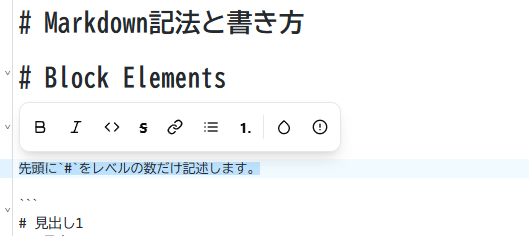
Section titled “Useful Feature”When you drag to select text, a toolbar appears at the top.
You can add text effects with one click by selecting the desired style from the toolbar.